SoulSearch: AI Browser Extension with Private Git Memory, Sessions, and Browser Automation
Updated: March 2026 — added sessions, browser automation, memory management, and improved page extraction.
What SoulSearch Does
SoulSearch is a Chrome extension that adds a persistent AI assistant to every webpage you visit. Unlike chatbots that forget everything between sessions, SoulSearch remembers — because your memory lives in a Git repo you own.
Open it on any page and ask: “Summarize this article”, “What does this calculator do?”, “How does this compare to what I researched last week?” It reads the page, checks your memory, and answers in context.
UI Quick Reference
When you open SoulSearch, here’s what every element does:
Top bar
- 📄 (page strip) — shows the title of the page you’re currently on; the AI is reading this page
- ⚙ Settings — opens the Settings panel to configure your LLM key, model, and Git repo
Session bar (above the chat)
- Dropdown — switch between named conversation sessions; each has its own independent history
- + — start a new session (fresh chat, blank history; memory is shared)
- 🗑️ — delete the current session
- 🗑️ chat — clear messages in this session without deleting it
Chat input area
- 📄 (context toggle) — when lit, the current page text is included in every message; click to toggle page context on/off
- 🧠 (memory button) — opens the memory panel showing your full MEMORY.md
- 🤖 (agent mode) — click this first to enable browser automation; the button turns purple, the send button changes to Run Agent, and the input placeholder changes to “Describe a task to perform on this page…”; click again to return to chat mode
- Ask → / Run Agent — send your message (chat mode) or execute an agent task (agent mode)
Memory panel (opened by 🧠)
- Shows your full MEMORY.md — everything SoulSearch knows about you
- ↺ — open version history: lists last 10 Git commits to MEMORY.md; click any to restore that version locally
- 🚀 — push your current local memory up to your Git repo
- ✕ — close the panel
- save to memory button (on each AI response) — append that response to your local memory; use 🚀 afterwards to sync to Git
Right-click context menu (on any webpage, no popup needed)
- Save to SoulSearch memory — saves your selected text directly to memory
- Ask SoulSearch about this — opens the popup with your selection pre-filled
- Summarize this page — opens the popup and immediately summarizes
Screenshots
Page-Aware Chat — Colab Notebook
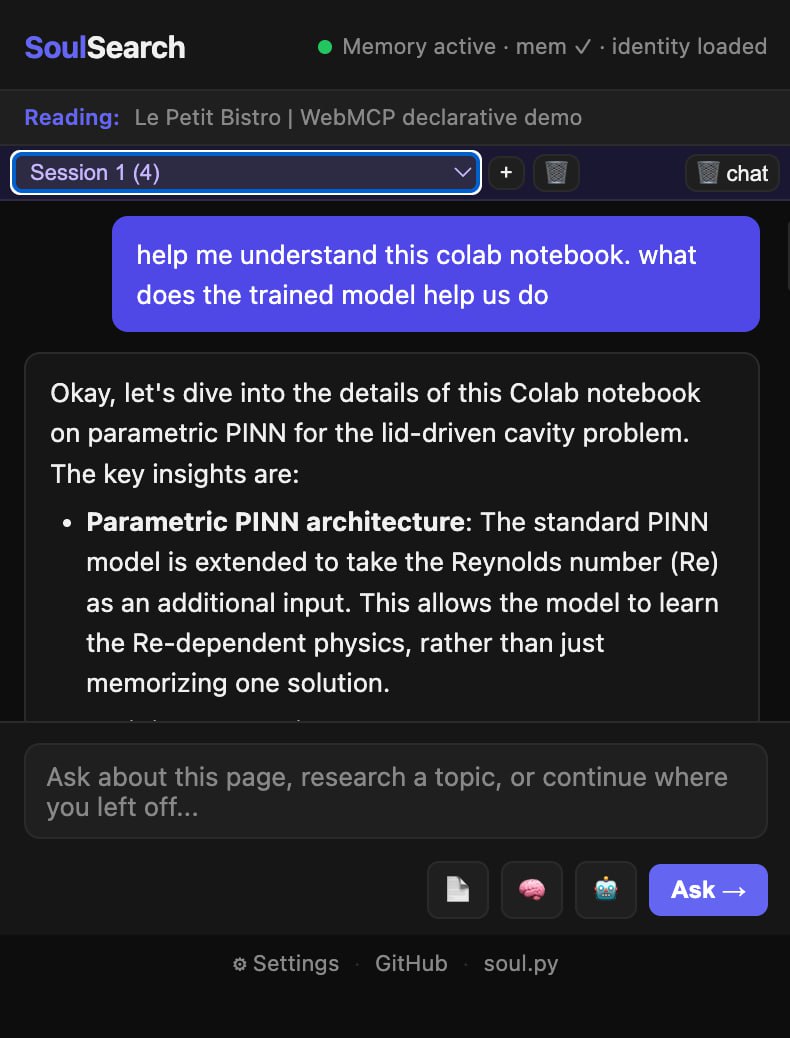 SoulSearch reading a Google Colab notebook and explaining the parametric PINN architecture — page context injected automatically.
Agent Mode — Restaurant Reservation Form
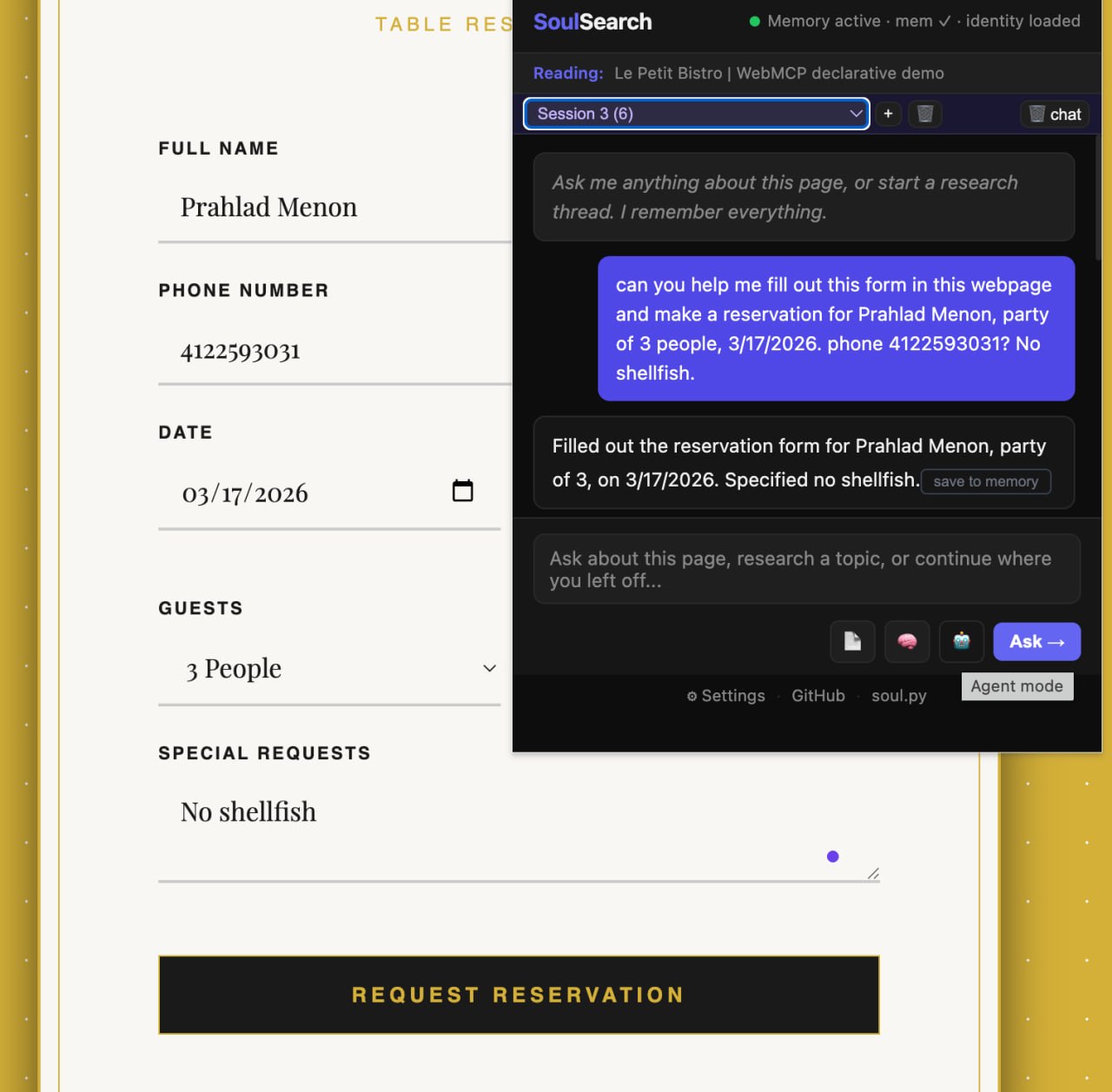 Agent mode filling in Full Name, Phone, Date, Guests, and Special Requests on a live demo form — all from a single natural language instruction.
Memory Panel — Saved Research
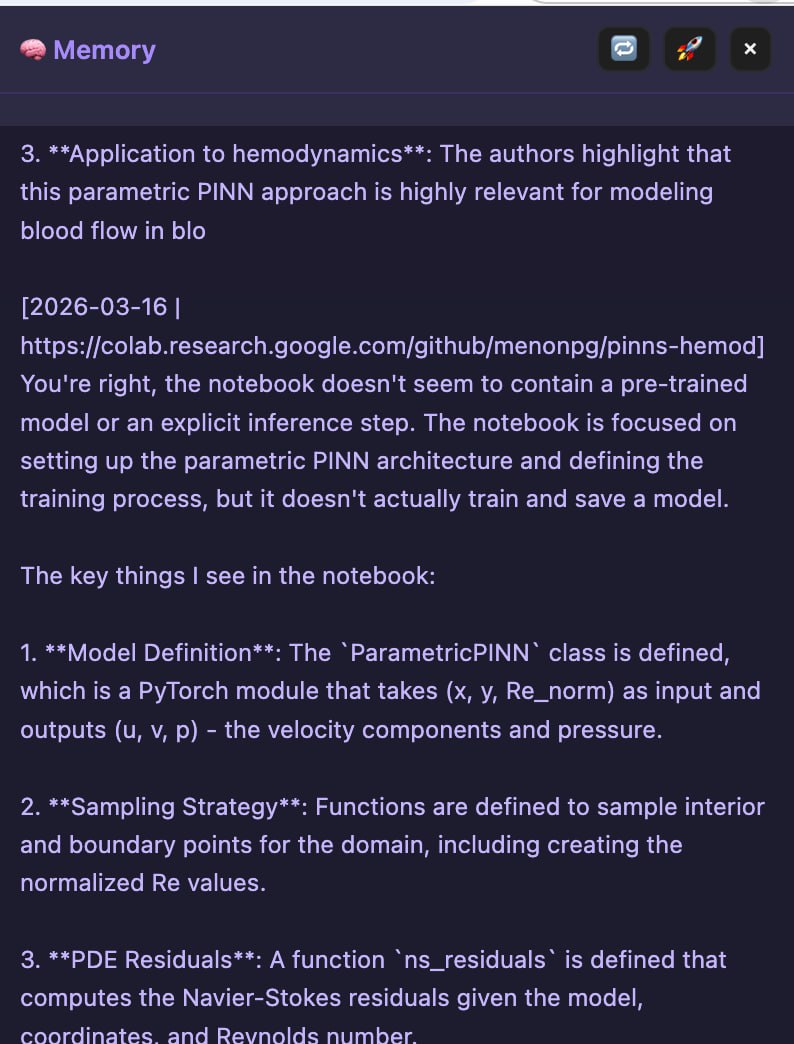 The 🧠 memory panel showing research notes saved from a Colab session. The ↺ button restores from Git history, 🚀 pushes to your repo.
Settings — LLM Configuration
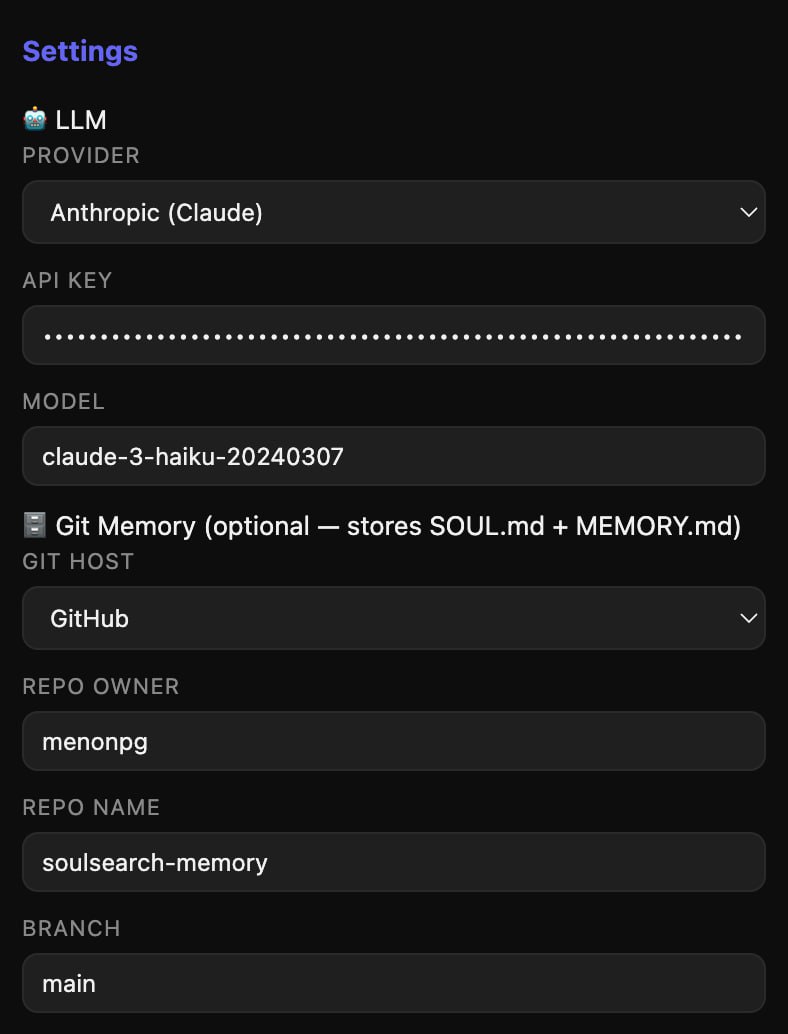 Settings panel: choose Anthropic, OpenAI, or Gemini, paste your API key, and pick your model. All stored locally, never synced.
Settings — Git Memory Configuration
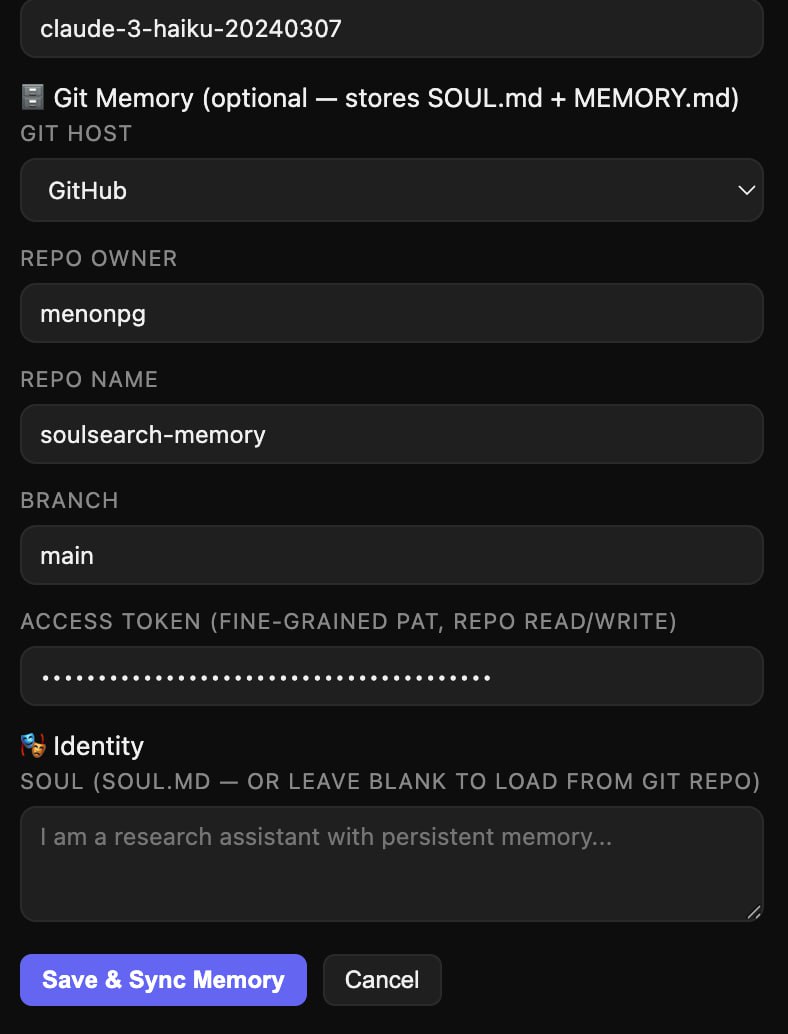 Git Memory section: point SoulSearch at any private repo and it pulls your SOUL.md and MEMORY.md on every session start.
Core Features
Page-Aware Answers
When you open SoulSearch on any webpage, it reads the visible content using chrome.scripting.executeScript — pulling document.body.innerText directly from the active tab. No DOM manipulation, no element removal. Clean, reliable text extraction that works on SPAs, React apps, and standard pages alike.
The page content is injected into the system prompt as the primary source. Your personal memory is injected as background context. The LLM answers from the page first, your memory second.
Git-Backed Memory
Your memory lives in two files in a private Git repo:
- SOUL.md — your agent’s identity, personality, and research focus
- MEMORY.md — accumulated knowledge, notes, and saved research
SoulSearch reads these at startup and caches them locally. You control every byte. Supported backends:
- GitHub (private repo + fine-grained PAT)
- GitLab (gitlab.com or self-hosted)
- Gitea / Forgejo (including Raspberry Pi)
The 🧠 memory panel shows your full MEMORY.md, scrollable. Three controls:
- ↺ — open version history (lists last 10 commits to MEMORY.md, click any to restore)
- 🚀 — push current local memory back to Git
- ✕ — close panel
Sessions
Each conversation is a named session stored in chrome.storage.local. The session bar sits above the chat:
- Switch sessions from a dropdown (shows message count)
- + creates a new session with a fresh chat
- 🗑️ deletes a session
- 🗑️ chat clears messages in the current session without deleting it
Sessions share your identity and memory. Each has its own independent conversation history.
Save to Memory
Every assistant response has a small save to memory button. Click it to append that response — with date and page URL — to your local soul_memory. Then hit 🚀 to push to Git.
Right-click any selected text on any page → Save to SoulSearch memory to save without opening the popup. The context menu also supports Ask SoulSearch (pre-fills the input) and Summarize this page.
Agent Mode — Browser Automation (Experimental)
Click the 🤖 button to enter Agent Mode. The send button becomes Run Agent. Describe a task in plain English and SoulSearch will act on the page.
“Fill in my name as Prahlad Menon in the first name field” “Click the Submit button” “Search for ‘soul.py’ in the search box”
SoulSearch uses Anthropic tool calling to snapshot interactive elements, click, type, scroll, and navigate — up to 12 steps.
Works best on: standard HTML forms, search boxes, Wikipedia, documentation sites, contact/signup pages with native <input> and <select> elements.
Limited support for: React/Vue SPA custom dropdowns, multi-step wizards with cascading state, slider controls, and pages with strict CSP restrictions.
Agent mode is experimental in v0.1 and improves with each release.
Model Selection
The Settings panel has a freeform Model text field. Default is claude-3-haiku-20240307 (available on all Anthropic tiers, fast and cheap). Upgrade to claude-3-5-sonnet-20241022 for better reasoning, or switch to GPT-4o or Gemini 1.5 Flash by changing the provider and model.
The “Monica in Your Browser” Idea
Here’s the thing that makes SoulSearch different from every other AI browser tool.
If you point the Git settings at a repo that contains your agent’s actual SOUL.md and MEMORY.md — the same files that define its identity on Telegram, Railway, or wherever else it runs — you’re talking to the same agent in your browser.
Same personality. Same memory. Same context about who you are and what you’re working on.
Git is the thread. The agent travels across surfaces — Telegram, browser extension, Railway deployment — connected by two plain text files in a private repo.
Installation
SoulSearch is now live on the Chrome Web Store! ✅ Approved and published March 19, 2026. Install it here.
In the meantime, install directly from source:
git clone https://github.com/menonpg/soulsearch- Open
chrome://extensions/ - Enable Developer mode
- Click Load unpacked → select the
soulsearchfolder - Click the SoulSearch icon → ⚙ Settings
- Add your Anthropic/OpenAI/Gemini API key
- Add your Git repo owner, name, and PAT
- Click Save & Sync Memory
Community
Comet is great but I don't want to switch browsers -- built a Chrome extension
by u/the_ai_scientist in r/Perplexity
Privacy
- API keys stored in
chrome.storage.localonly — never synced through Chrome Sync - Page text is sent to your LLM provider directly (no proxy)
- Memory is stored in your own private Git repo
- No analytics, no telemetry, no SoulSearch servers
Links
- GitHub: menonpg/soulsearch
- Memory repo template: menonpg/soulsearch-memory
- soul.py: PyPI soul-agent
- Landing page: menonpg.github.io/soulsearch